
Time Tracking in Jira for Project Teams
Time tracking in Jira or using detailed worklogs isn't just about recording hours—it’s about gaining visibility, improving planning, and maximizing team efficiency.
Introduction:
As a project manager, you know how challenging it can be to keep time under control.
Without the right tracking tools, it’s easy for things to slip through the cracks—leading to budget overruns, missed deadlines, and frustration across the team.
But what if you could take full control of your projects, tracking every second and every dollar, directly within your existing tool?
That’s where time tracking in Jira comes into play. By using Jira’s built-in time tracking features, you can keep everything on track, make data-driven decisions, and deliver projects on time.
In this ultimate guide, we’ll walk you through everything you need to know to optimize time tracking in Jira. From setting it up to fine-tuning your processes, and even leveraging powerful tools to boost your productivity.
Why Time Tracking in Jira Matters
Time tracking in Jira is essential for every project, no matter the industry. Without them, you risk losing control over budgets, timelines, and resource allocation. Accurate time tracking helps project managers:
- Track the actual vs. estimated time: It allows you to compare time estimates with the actual time spent, helping you refine future estimates.
- Increase efficiency: Tracking time allows you to identify inefficiencies and areas for improvement.
- Improve forecasting: With accurate data, you can make more accurate predictions for future projects.
By using time tracking in Jira, you can keep your projects on track. For enhanced accuracy and ease, get hands-on with the Worklog Time Tracking & Timesheet app by RVS Softek, seamlessly integrating with Jira for automated time logging and detailed reporting.
How to Set Up Time Tracking in Jira
To get the most out of the Jira time tracking report, it’s important to first set it up correctly. In this section, we’ll walk you through the simple steps to configure time tracking in Jira, so you can start keeping track of time effortlessly and ensure your projects stay on track:
Step 1: Enable Time Tracking in Jira
The first thing you need to do is enable time tracking in Jira. By default, Jira provides time tracking options that allow you to log time for each task. To enable it:
- Go to Jira's settings.
- Select "Issues."
- Under the "Time Tracking" section, click "Edit."
- Choose your desired time tracking settings (e.g., time format, working days, etc.).
- Once enabled, Jira will allow you to log the time spent on each issue, whether it’s minutes, hours, or days.
Step 2: Use Work Log and Time Logging
Once you’ve set up time tracking in Jira, you can start logging time spent on tasks. Each issue in Jira allows you to log time under the "Work Log" section.
- Manual Time Logging: Click on an issue, scroll down to the "Work Log" section, and manually enter the time you’ve spent.
- Automatic Time Logging: If you use Jira automation rules, you can automatically track time based on workflow transitions, such as starting and completing a task.
Step 3: Best Practices for Time Entries
To make sure your time tracking in Jira is accurate and useful, consider these best practices:
- Use Sub-Tasks: Break down large tasks into smaller sub-tasks to ensure more precise time tracking.
- Log Time Immediately: Encourage your team to log time immediately after completing a task to avoid forgotten entries.
- Label Issues Clearly: Add labels or comments to issues to clarify the type of work and the time it took.
Introducing RVS Softek’s Worklog Time Tracking & Timesheet
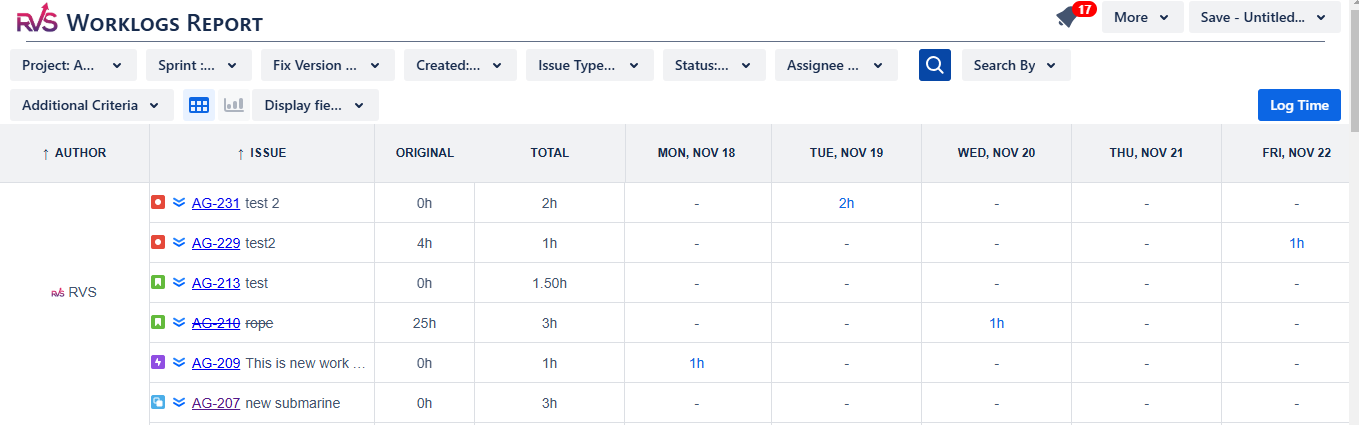
Make your project management more efficient with Worklog Time Tracking & Timesheet by RVS Softek. Seamlessly integrating with Jira, this tool automates time logging, reducing errors and saving valuable time for your team.
With comprehensive worklog reports and a clean timesheet view, you can easily track time spent on tasks, manage billable hours, and gain real-time insights into project progress. Customizable filters allow you to focus on specific tasks or sprints, ensuring that you have precise data to optimize resource allocation and stay on budget.
Key features of RVS Softek Worklog Time Tracking & Timesheet include:
- Powerful Time Tracking Reports: Generate detailed reports to understand where time is being spent across your projects.
- Customizable Time Tracking Filters: Adjust your filters to focus on the data that matters most to your team.
- Efficient Jira Timesheet View: A streamlined timesheet interface that makes it easy to view and manage time logs.
- Multiple Time Entry Views: Choose from various time entry formats that suit your workflow, whether it’s manual logging or automated entries.
- Automated Time Logging: Save time and reduce errors with automated time entries based on task status transitions.
- Detailed Worklog History: Access a comprehensive history of work logs for better tracking, reporting, and project analysis.
In addition to Worklog Time Tracking and Timesheet, RVS Softek offers other useful tools like Agile Tools for Jira, Issue Hierarchy, and Capacity Planner, which further enhance your ability to track time effectively across Jira projects.
- RVS Time in Status: Tracks time spent on each status in Jira workflows, providing insights to improve time estimation in project management.
- Agile Tools for Jira: RVS’s agile tools enhance Jira’s time tracking, allowing for real-time planning, tracking, and reporting.
- Capacity Planner: Track team capacity, allocate resources, and stay on budget by visualizing available bandwidth.
With RVS Softek’s tools, you can optimize your time tracking in Jira and ensure that your projects are delivered on time.
Ready to streamline your workflow? Try Worklog Time Tracking and Timesheet now on Atlassian and experience the difference!
Conclusion
Managing time effectively is at the core of successful project delivery. Without the right tools in place, it’s easy to lose control, leading to delays and budget overruns. By incorporating Jira Software Time Tracking, you can transform how your team manages time —improving visibility, enhancing productivity, and ensuring deadlines are met.
With tools like RVS Softek’s Worklog Time Tracking & Timesheet, you get a comprehensive, automated solution that integrates seamlessly with Jira. Gain real-time insights, optimize your workflows, and keep your projects running smoothly.
Schedule your RVS Time Tracking Jira demo today and experience the difference.